✦ AI Social Media
Let AI run social.
Your team keeps the decisions.
From brand voice to a multi-channel schedule, the AI Social Agent produces content steadily, sends the important posts to you for approval, and tracks performance all the way to the lead.
- 83%
- posts written by the agent
- 72
- posts in the period
- 184K
- reach
AI Social Agent · Overview Agents running

✓ Always under control6 posts awaiting your approval
It is not a shortage of ideas
Social has to run steadily.
The team cannot keep growing.
Each channel needs its own format, each day needs new content, and every post needs tracking. The real bottleneck is the operational volume behind it.
01 · Volume grows
A week of posting is not just “writing captions”.
- ✓Keeping the schedule steadyWeekly, monthly and across several channels
- ✓Staying on brand voiceNot drifting as volume increases
- ✓Approving and handling exceptionsKnowing which posts are waiting or failed
83%posts in the period
written by the agent

✦ AI suggests the time slotsThe schedule keeps running when the team is busy

02 · The team keeps the decisions
The agent takes the repetitive work.
You focus on what makes the difference.
- ✓Setting strategyGoals, messaging and priorities
- ✓Approving the content that mattersKeeping control before anything is published
- ✓Nurturing opportunitiesBringing valuable interactions into the CRM
-
01 · Growing SMEs
They need a steady presence without building a large marketing team.
-
02 · Ecommerce and services
They need content and engagement turned into leads, meetings or orders.
-
03 · Small marketing teams
They need more output while staying on brand voice and inside the approval process.
Results you can track
Not just how many posts went out.
See which opportunities the content creates.
The AI Social Agent links social metrics to the customer journey, so the team knows which channel is generating engagement and what to optimise next.
- 184K
- Reach
- +22% on last month
- 5,2%
- Engagement rate
- 9,568 likes, comments and shares
- 72
- Posts in the period
- 60 written by the agent
- 6
- Posts awaiting approval
- The oldest has waited 2 days
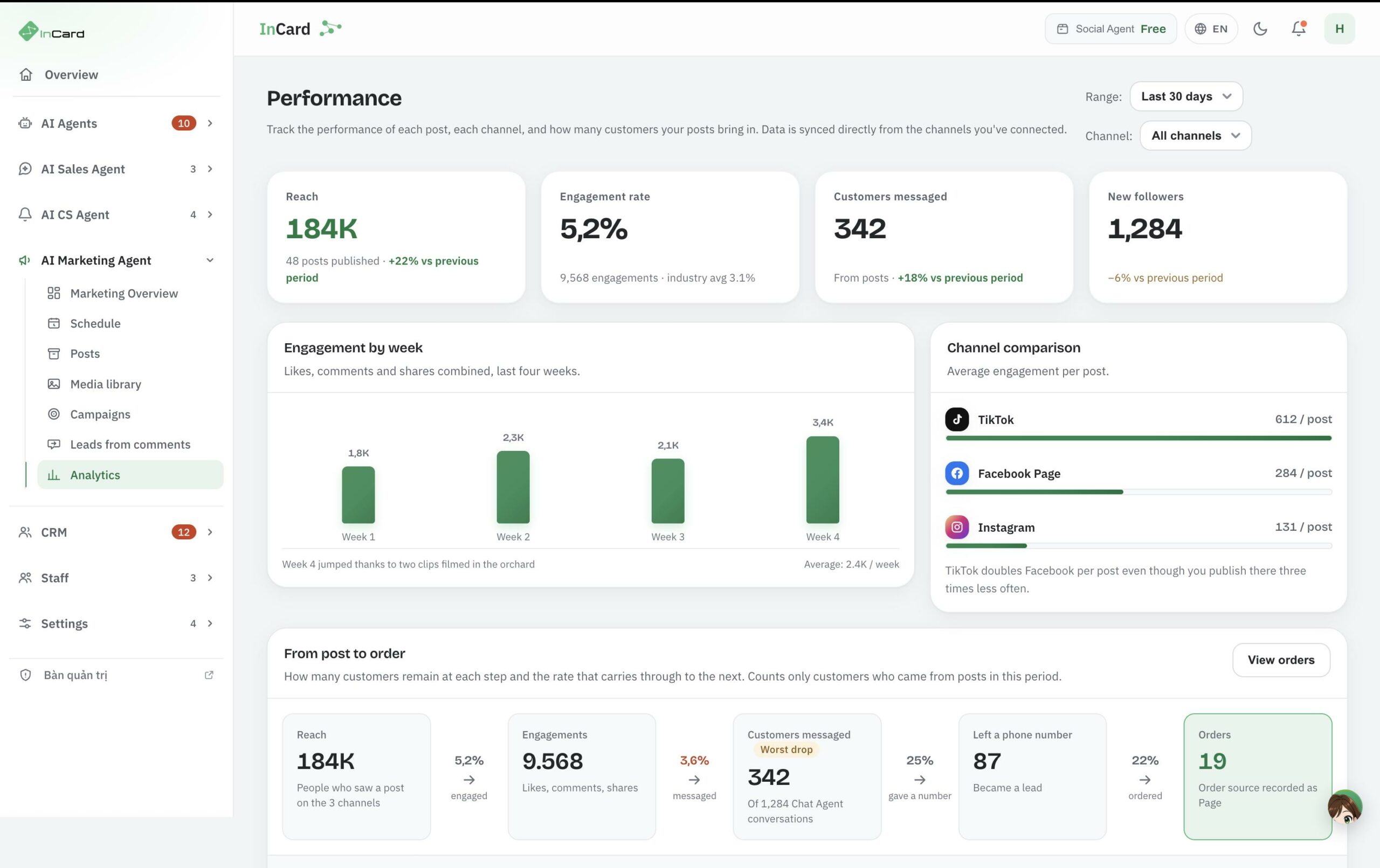
One screen for the operating rhythm and the results.
Source data from the AI Social Agent Overview screen.
✦ AI assessmentPoints at the bottleneck and what to do next
From content to results
Measure the whole journey,
not just vanity metrics.
Each step shows how far the content carries a customer — from seeing a post to placing an order.
* Results depend on your industry, data, budget and how you deploy.
- Reach184K
- Engagement9.568
- Messages1.284
- Phone numbers312
- Orders47
The content operating system
Three operating layers.
One continuous flow.
The AI Social Agent connects the brand foundation, content production and multi-channel distribution — instead of leaving the team to stitch separate tools together.
01 · Brand foundation
Set the voice and the audience first. The agent gets it right from the first post.
Brand Voice holds the brand profile, tone, industry and products for every agent to share. Campaigns describe the audience: traits, interests, pain points and goals.
- ✓One shared brand voiceSeveral agents holding one voice
- ✓Audience profilesTraits, interests, pain points, goals
- ✓Set up onceNo need to describe it again for every post
02 · Content production
One agent per topic. The team only approves what matters.
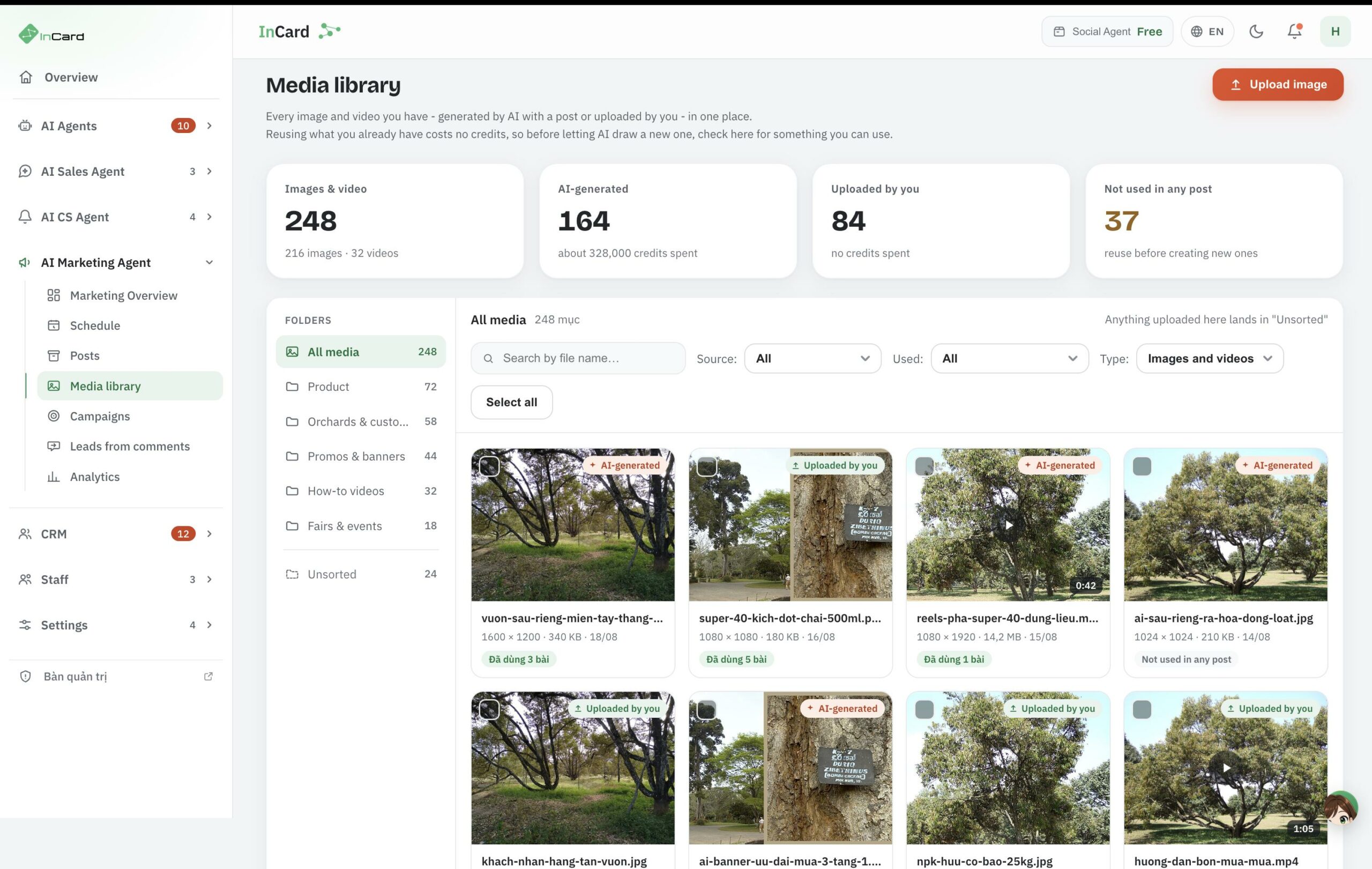
The agent writes posts to the schedule and brand voice you set. Everything lands in one shared library with a clear source and status.
- ✓An agent per topicIts own frequency and channels
- ✓One content libraryDraft, awaiting approval, scheduled, published
- ✓There is always a control stepYou approve before it is published
03 · Multi-channel distribution
One schedule for every channel. Posts go out at the time you set.
View the schedule by week or month, filter by channel, and see which posts are due, published or need attention. Facebook, Instagram, TikTok and LinkedIn accounts connect in one place with their connection status.
- ✓Weekly and monthly viewsFilter by channel, drag to change the time
- ✓Four platforms, one place to manage themFacebook, Instagram, TikTok, LinkedIn
- ✓What needs attention is visible immediatelyPosts awaiting approval or that failed to publish
- ShapeBrand Voice + Audience
- ProduceAgent + library
- DistributeSchedule + multi-channel
Multi-channel and integrations
Connect once.
Operate across many channels.
InCard already ships screens for managing social connections, conversation channels and business systems. The team can see which channels are running, which tokens need attention and what data is synced.

✓Live status7 channels running
!Needs attentionTokens are flagged clearly
01 · Social networks
Not just logos. The actual operating status.
Each platform shows the accounts connected, the formats supported and a connect action right inside the product.
- fFacebook PagePosts, images, video, Reels
- igInstagramFeed, Reels, Story
- ttTikTokVideo and account status
- inLinkedInPosts, images, documents

✓Valid tokens6 channels running
!Needs attentionBroken channels are flagged
02 · Conversation channels
Every reply goes into the same handling flow.
Connect messages and comments from several platforms so the AI Chat Agent or a person can pick them up without opening each app.
- fFacebookMessenger and Page comments
- zaZalo OAZalo OA and ZNS messages
- waWhatsAppBusiness account messages

↔Data syncedCustomers · Bookings · Invoices
◷Integration roadmap“Coming soon” is marked clearly
03 · Business systems
Bring the data you already have into the care journey.
Connect your PMS and CRM so customer records, transactions and service history become data for care and remarketing.
- 1POnePMSGuests, bookings and invoices
- BJBlue Jay PMSProfiles and booking calendars
- EZEZCloudMarked “coming soon”
- OPOracle OperaFor large hotel chains
Illustrative scenario
A post does not end at the publish button.
It can start a sales opportunity.
Follow a sample scenario from the agent proposing content to a customer leaving a phone number and appearing in the CRM.
GBGreen BioIllustrative scenario · Agriculture
“Keep the technical content coming and route interested customers to sales.”
Result within the flow1 new leadThe source is preserved
- 01The agent proposesOn topic and on brand voice
- 02A person approvesControl before publishing
- 03The post goes outFacebook and Instagram
- 04The lead lands in the CRMWith its source and the next action
✦The “Growing techniques” agentRunning · 3 posts/week · Facebook and TikTok

✓“Read the leaves: 4 signs your crop is short of potassium”Single-channel post · Published · Facebook Green Bio
PVPhan Quốc Việt0977 ••• 289Hot lead
- Source
- Page: Super Super 4.0
- Interested in
- Fruit nutrition products
- Stage
- Phone number just captured
- Owner
- Not yet assigned
◷Next actionCall within 30 minutesHot lead who just left a number
↗The social source is never lostSales know where the customer came from and what to do next.
✦The AI does not close deals by itself.The AI keeps content flowing, records the signals and passes the right opportunity to a person.
See the real product flow* The scenario, names and data above are constructed to illustrate how the product works. This is not a customer testimonial and not a commitment on revenue or lead volume.
Product interface
Where you watch content and results.
The two screens you use daily in AI Social Marketing.
The product has both a Vietnamese and an English interface — the screenshots below are from the English one.
Frequently asked questions
Before you let AI
run social with your team.
The practical questions about control, brand voice, channel connections, data and measurement.
Your question is not here?
The InCard team will help work out a rollout that fits your current channels and processes.
Talk to an expertBrand Voice stores your forms of address, tone, audiences, products and the rules on what should and should not be said. Every social agent reuses that profile when writing.
- The team can edit the brand voice at any time.
- Content still goes through approval before publishing.
No. The agent writes to the schedule and brand voice you set, but posts stay in the library until someone approves them. Approval is the gate before anything reaches a channel.
- Every post has a clear status: draft, awaiting approval, scheduled, published.
- Frequency and channels are set per agent and can be stopped at any time.
The social connections screen manages Facebook Page, Instagram, TikTok and LinkedIn, with the accounts connected and the formats each platform supports. Single-channel and multi-channel posts are scheduled in the same place.
- Formats and publishing permissions depend on each platform’s API policy.
- Where a platform restricts automated posting, the flow becomes a scheduled reminder to post rather than direct publishing.
Messages and comments from connected channels flow into one place for the AI Chat Agent or a person to pick up, instead of opening each app. The channel connections screen shows Facebook Messenger and Page comments, Zalo OA/ZNS and WhatsApp.
- Reply and follow-up capability depend on each platform’s messaging window.
- The owner can take over any conversation at any point.
Approval is where wrong content is corrected or dropped before it reaches a channel. You set the posting frequency per agent, so content cannot multiply beyond what you defined. Failed posts and broken channels appear directly on the schedule to be dealt with.
- Brand Voice records what should not be said, not only the tone.
- You can stop one agent without affecting the others.
Channel data and customer profiles are used to write for the right audience, record where a lead came from and support care in the CRM. When connecting an existing PMS or CRM, the set of fields to be synced is agreed before rollout.
- Social accounts connect through the platform itself and can be disconnected at any time.
- Access scope, retention and applicable terms are defined per project.
The analytics follow one thread: reach, engagement, messages, phone numbers, then orders. Each lead keeps its source — the page and channel that brought the customer — so sales know where the opportunity came from and what to do next.
- The figures depend on your industry, the data available, budget and how you deploy.
- The AI points at the bottleneck in the flow; people decide what to do.
The connections screen shows which tokens are valid, which need attention and which channels are broken, so reconnecting is one clear action rather than a hunt for the cause. When a platform changes its API policy, InCard updates the connector; anything that changes on the platform’s side is announced before it affects the schedule.
- A post due on a disconnected channel appears in the to-do list instead of quietly passing by.
- Each channel reconnects independently; you do not have to redo them all.