
AI Customer Care
Repeat questions get answered.Your support team handles what needs a person.
The agent answers strictly from the documents you supply, logs and classifies requests, follows up customers who went quiet, then hands over to a person with the whole conversation attached — across Zalo, Messenger, WhatsApp, your website and email.
Four places support runs out of road
There is not much hard work.It is the repetitive work that eats the day.
Most of a support inbox is questions that already have answers. They crowd out the cases that genuinely need someone to sit down and work through them.
Every day
The same question, answered from scratch again
Where is my order, how do returns work, how do I use this. These fill most of the inbox and everyone types the answer again.
Out of hours
Customers ask when nobody is on duty
People still need help late at night, at weekends and on holidays. Left until morning, a small question becomes a complaint.
When something goes wrong
Complaints drift between channels
A customer reports it on Zalo, repeats it on Facebook, then calls the hotline. Nobody is sure the request reached the right person.
After the purchase
Customers go quiet, then disappear
Nobody checks in, nobody reminds them to renew. By the time you need them, they are using someone else.
Four jobs the agent takes on
Not just answering to be done with it.Requests are logged and followed through.
What separates it from an FAQ chatbot: every conversation leaves a status, has an owner, and has a handover step when it goes beyond what the agent is allowed to do.
Answers strictly from the documents you supply
Load in your FAQs, returns policy, user guides and terms. The agent answers within that scope; anything outside it goes to a real person rather than being guessed at.
- Answers in the language you configure
- Guardrails limit what it may answer
- If it is not in the documents, it does not infer
Logs and classifies requests
Every report becomes a request with a status, assigned to the right team — instead of sitting scattered across several inboxes.
- Brings requests from every channel into one place
- Classified by topic and urgency
- Pushed into your ticketing system if you use one
Looks up status in your own systems
Orders, appointments and service status are read from the connected system within the permissions granted — the bot does not remember them itself.
- Reads status within the permissions granted
- Answers only about the customer asking
- With no connection, it says plainly that it cannot check
Follows up customers who went quiet
After an interval you set, the agent messages again on the channel the customer actually uses. Flip the switch and it stops immediately; the reminders are kept.
- You configure the silence threshold
- Messages on the channel they are using
- Records replies so you know what to fix
Boundaries
How far the agent goes.And where it stops.
Customer care touches refunds, compensation and account data — so the boundaries are set at configuration time, not patched after something happens.
Things with a clear answer in the documents you approved.
- Answer questions within the loaded documents
- Look up order or appointment status within granted permissions
- Log and classify requests and complaints
- Follow up quiet customers at the threshold you set
The agent prepares the case; a person decides.
- Refunds, compensation or waiving fees
- Exceptions to the published returns policy
- Renewals, cancellations or changes to terms
- Replying to public complaints on social media
Beyond this scope the conversation goes to a real person.
- Answer anything not in the loaded documents
- Read account data beyond the permissions granted
- Verify identity in place of your own process
- Promise outcomes or make commitments beyond its authority
By industry
The same agent.Scripts written for your industry.
The common questions, how much the agent may answer alone and the threshold for handing over all differ by industry — so the scripts are built per industry, not shared from one template.
E-commerce
- Check order and shipping status
- Guide exchanges and returns
- Explain published policies
Services and SaaS
- Handle common technical questions
- Walk through the documentation
- Log bugs and route them to engineering
Travel and accommodation
- Answer questions about services and facilities
- Take change and cancellation requests
- Log issues raised during a stay
Banking and fintech
- Guide procedures and forms
- Answer questions about published products
- Hand over to a person for anything needing verification
Integrations
Answers where the customer messages.Records where your team works.
How deep each connection goes depends on the platform’s API and permissions, so each level is stated explicitly rather than listed as equal.
Support channels
- Zalo OAPublic API available
- MessengerNeeds assessment
- WhatsAppPublic API available
- TelegramNeeds assessment
- Website chatPublic API available
- EmailPublic API available
Helpdesk and ticketing
- ZendeskPublic API available
- FreshdeskPublic API available
- Zoho DeskPublic API available
- HubSpot ServicePublic API available
- Internal ticketingNeeds assessment
Orders and operations
- ShopifyPublic API available
- WooCommercePublic API available
- HaravanNeeds assessment
- KiotVietNeeds assessment
- OdooNeeds assessment
- SAPNeeds assessment
Other
- Google SheetsPublic API available
- SlackPublic API available
- WebhookPublic API available
- REST APIPublic API available
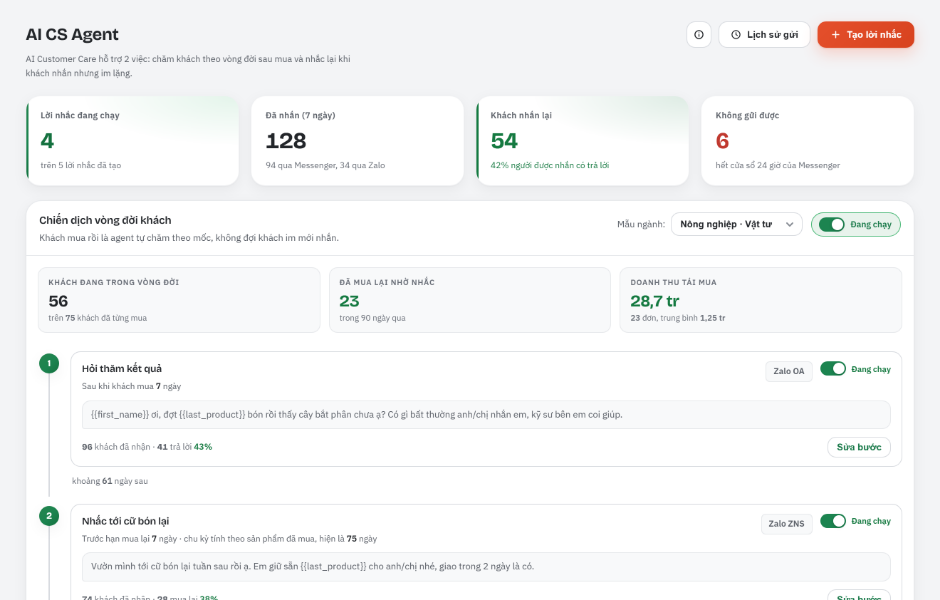
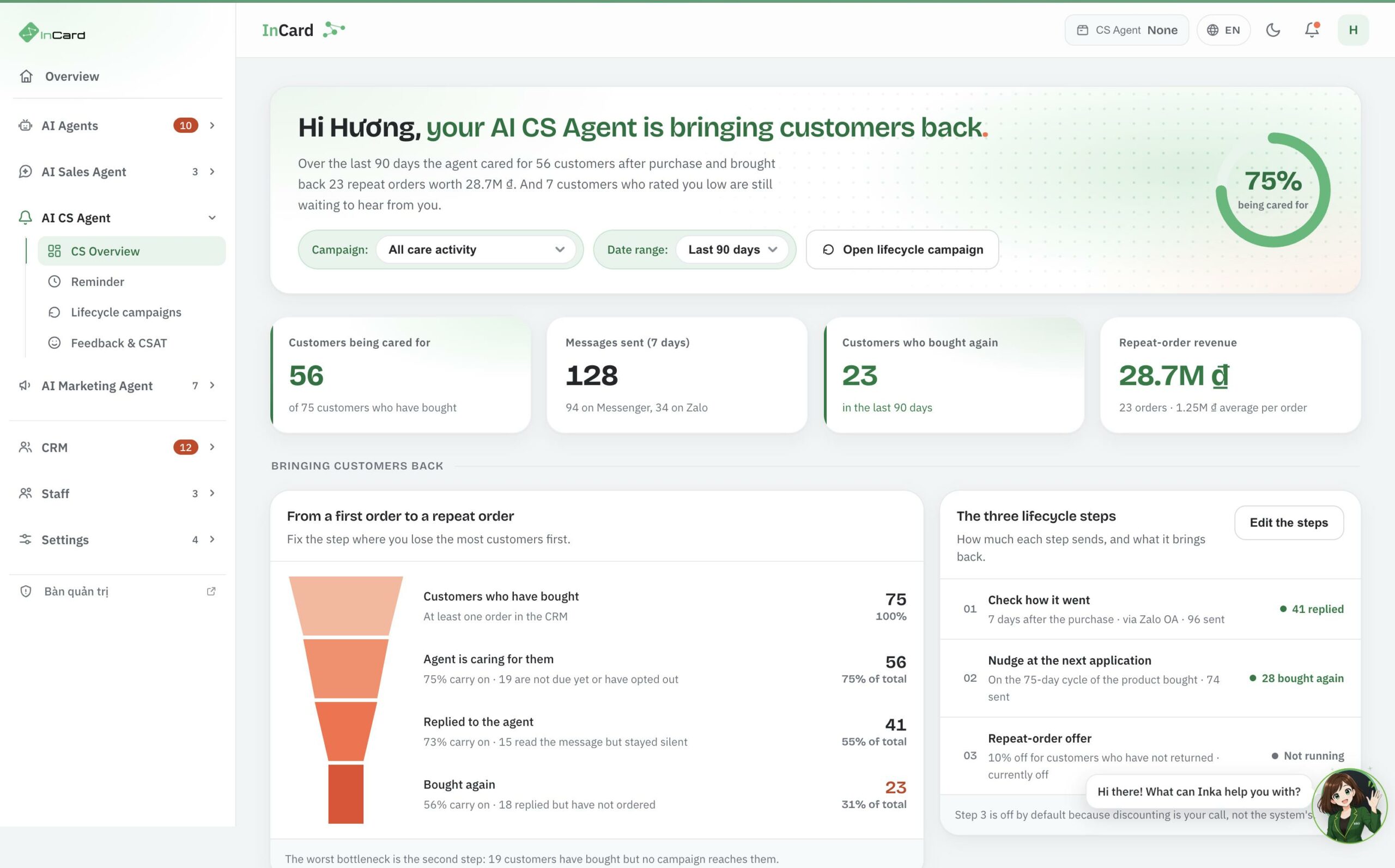
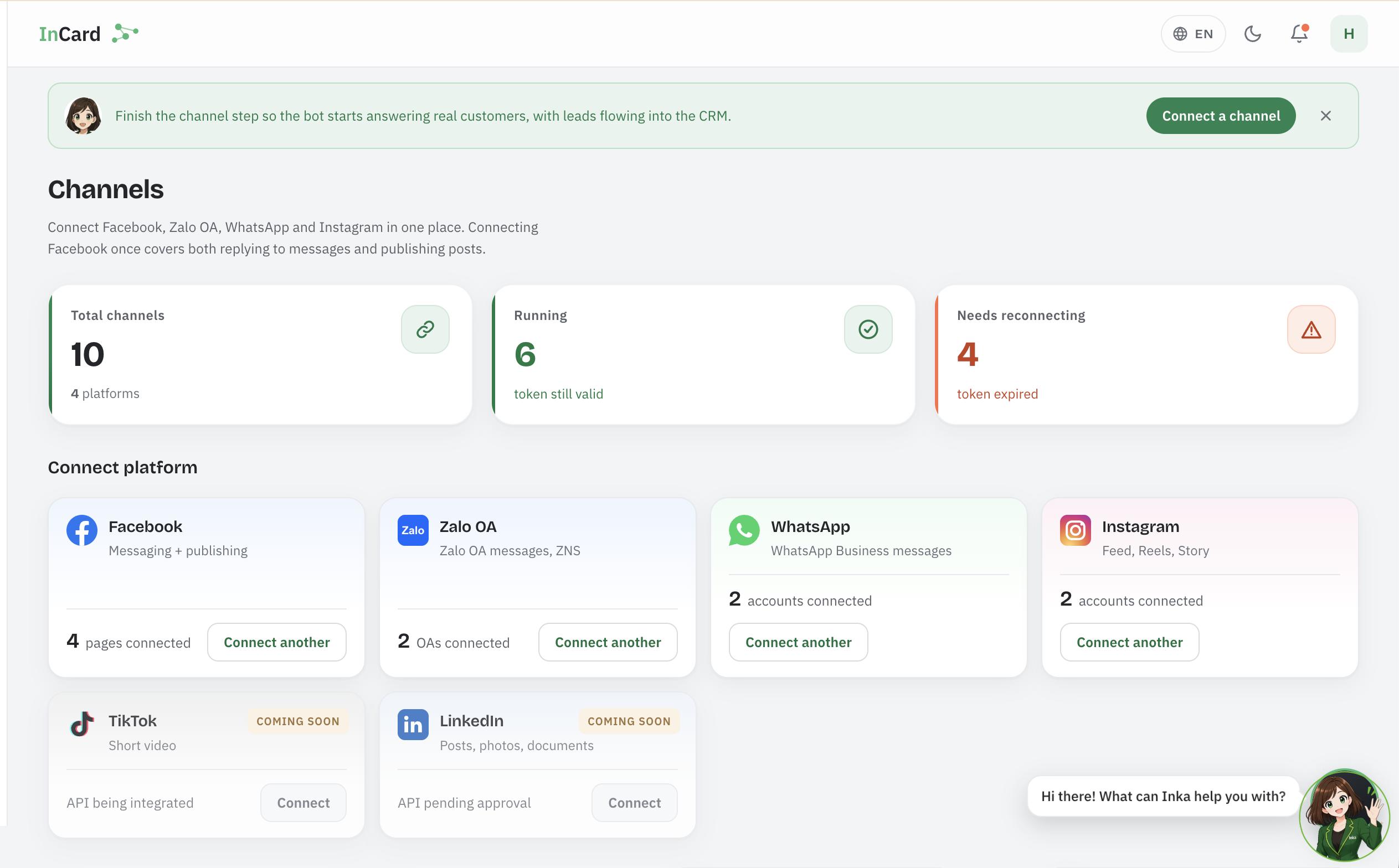
Product interface
The screens you will use to look after customers.
Track the customers being looked after and the channels connected.
The product has both a Vietnamese and an English interface — the screenshots below are from the English one.
Frequently asked questions
Before you let the agent answer your customers.
What support teams usually want cleared up about how far automation goes, how the agent learns and how results are measured.
Next step
See the agent running on your own documents.
A demo using your own policies and support scripts, so you can see how far the agent answers and where it stops.
-
Anything with a clear answer in the documents you supply: order or appointment status, policy questions, process guidance, logging complaints and booking appointments. Complex cases go to a person with the full context.
-
No. Refunds, compensation, policy exceptions and cancellations all sit in the group that needs a person to confirm. The "Boundaries" section above lists exactly what the agent does itself, what needs approval and what it will not do.
The agent prepares the case — a person decides. -
It does not change them on its own. When a new question or a better answer appears, the content is proposed for the owner to approve before it enters the knowledge base. That way you always know what the agent is telling customers.
New content has to be approved by a person before it is used. -
You can still start with the FAQs and documents you have and fill the gaps over time. What matters more is setting the rule up front: anything outside scope goes to a real person rather than being guessed at.
-
As a reference, 1–2 weeks for answering and request logging on a few channels. Connecting to an order system or ticketing software usually takes longer, depending on how complex the integration is.
-
The share of requests the agent resolves end to end, the share handed over to a person, first response time, and which topics come up most — the last of these usually points at something to fix in the product or the documentation, not just in the agent.