
AI self check-in is a check-in process in which guests use their own phone to confirm the booking, photograph their identity documents and receive a door code, while an AI reads the data on those documents, matches it against the reservation and hands over to a staff member when something does not line up. Unlike a lobby kiosk or a lockbox, the whole flow runs on the guest device and needs nobody on duty.
A guest lands on a red-eye flight and reaches the property at 1am. The front desk closed hours ago. The owner either answers the phone all night or leaves the guest waiting outside. This is the everyday problem of small hotels, serviced apartments and homestays — not enough volume to justify a 24/7 desk, but guests still arrive at every hour.
Self check-in is how that problem gets solved. And once an AI layer reads the guest’s documents, cross-checks the data and answers in the guest’s own language, the process does considerably more than a box with a key in it.
What is self check-in?
Self check-in is an arrival process the guest completes themselves, on their phone or on a device at the property, without a staff member doing it for them. The guest confirms the booking, submits identity documents, pays the balance or the deposit, and receives the code that opens the room.
The most common version in practice is still the manual one: the guest messages the owner, the owner sends back a lockbox code. It works, but it depends entirely on someone being awake to reply. A proper system behaves differently — the flow runs on its own, everything is recorded, and nobody has to stay up.
How is AI self check-in different from a kiosk or a lockbox?
Three different levels, often called by the same name:
- Lockbox: solves key handover only. Documents, deposits and guest details still get handled by hand over chat.
- Lobby kiosk: automates the whole process, but needs hardware, needs floor space, and still requires the guest to be at the lobby while the machine is running.
- AI flow on the guest’s own phone: no hardware. The AI reads the passport or ID photo and fills the data in for the guest, checks visa validity against the checkout date, and answers questions inside the flow itself — in the guest’s language.
The real difference of the AI layer is not that it is automatic — a lockbox is automatic too. It is that it handles the cases that are not standard: a blurred document photo, a guest asking in Korean, a visa that expires before checkout, an early arrival. Those are exactly the situations that used to require a person.
What are the steps in an AI self check-in flow?
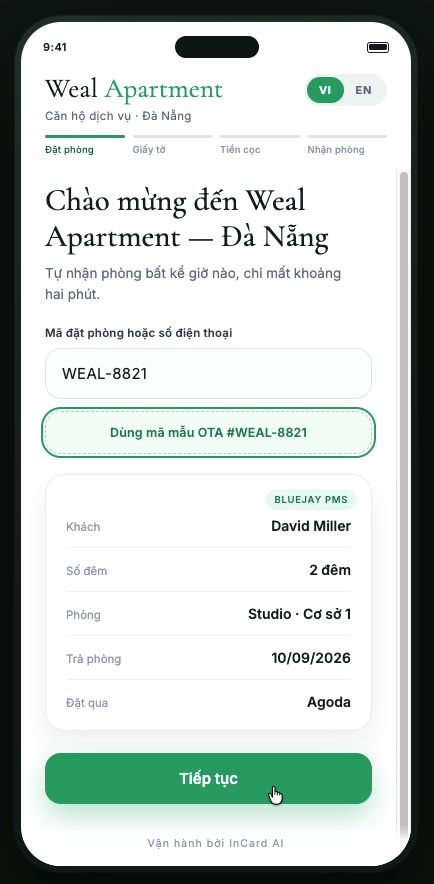
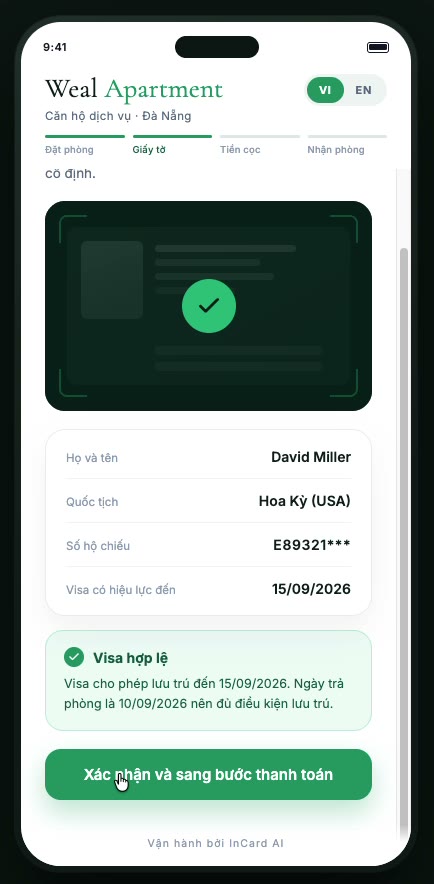
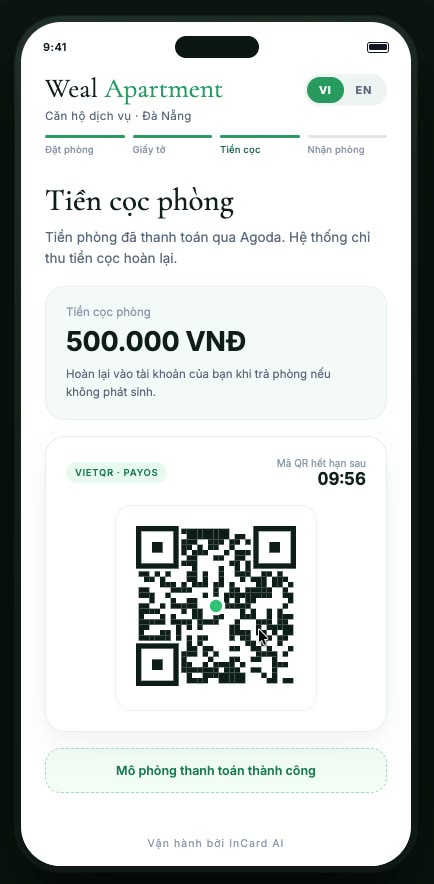
Below is the demo InCard built for a serviced apartment model, running all four steps from the moment the guest opens the link to the moment they hold the room key:
- Booking lookup. The guest enters the OTA confirmation code or the phone number used to book. The system finds the right reservation and shows it back for confirmation.
- Identity documents. The guest photographs their passport and visa. The AI reads the data off the image, pre-fills the fields, and compares visa validity against the expected checkout date — if the visa expires first, the flow stops and hands the case to a person.
- Deposit. The system generates a time-limited VietQR code the guest scans with their banking app. The amount, the reason and the refund conditions are shown before they pay.
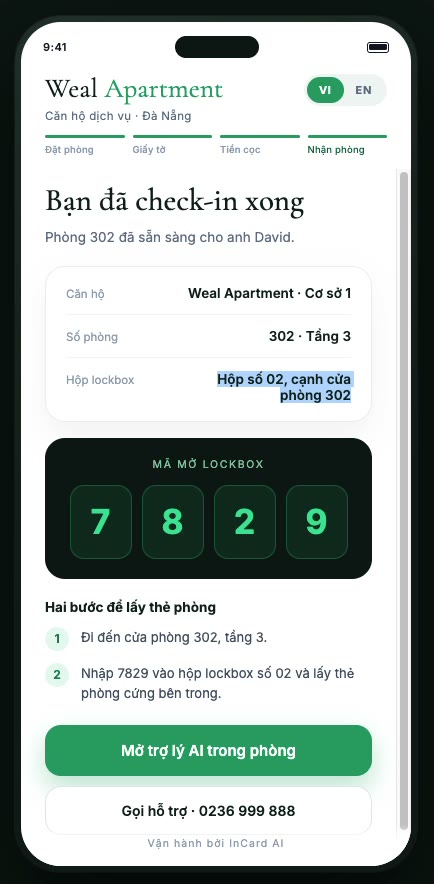
- Room access. The guest receives the room number, floor, lockbox location and opening code — plus a button that opens the in-room AI assistant for whatever comes next.
How does the AI handle identity documents?
The document step is the most fragile part of any automated arrival process, because it depends on a photo the guest takes themselves in whatever light they happen to be standing in. It is handled in three layers:
- Reading the data: name, nationality, document number and expiry are extracted and written into the form, so the guest only reviews instead of typing.
- Validity checks: passport and visa expiry are compared against the checkout date. This is the check most often missed when it is done by hand at midnight.
- Handover when unsure: a photo too blurred to read, data that does not match the booking, or a document type outside the supported set — the flow stops and alerts the person on duty rather than guessing.
Boundaries worth keeping
Two points not to skip when deploying in Vietnam:
- Guest registration remains the property’s obligation. A self check-in flow does not replace registering guests with the local police authority. What it does is collect the document data in already-extracted form, so whoever files the registration does it faster and with fewer errors.
- Document photos are personal data. Who may view them, how long they are kept and when they are deleted all need to be defined. That is a deployment decision, not something the system settles on its own.
What happens after check-in?
Most self check-in systems end the moment the guest gets the door open. But the requests that cost the most staff time arrive afterwards: a car to the airport at 4am, an air conditioner that is not cooling, a question about where to eat, a request for late checkout.
In the demo, the guest scans a QR code on the room desk to open an assistant tied to that specific room. It replies in whatever language the guest writes in — a message in Korean comes back in Korean — and for anything requiring real action it creates a ticket with the full context, routes it to the responsible team, and gives the guest a status to follow.
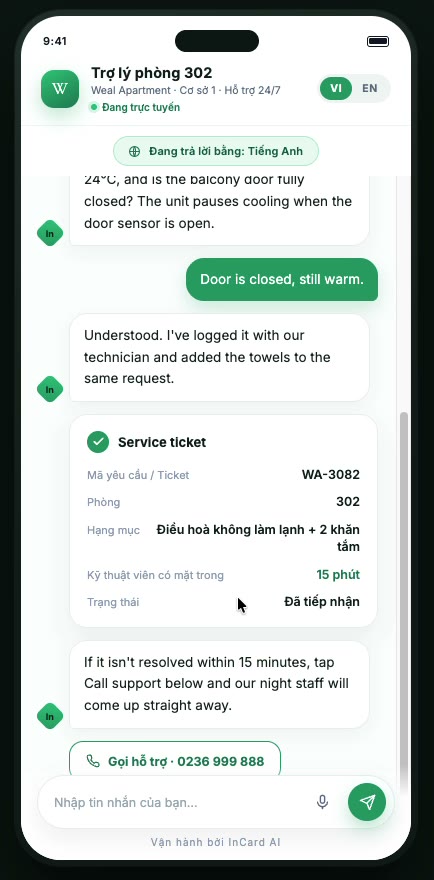
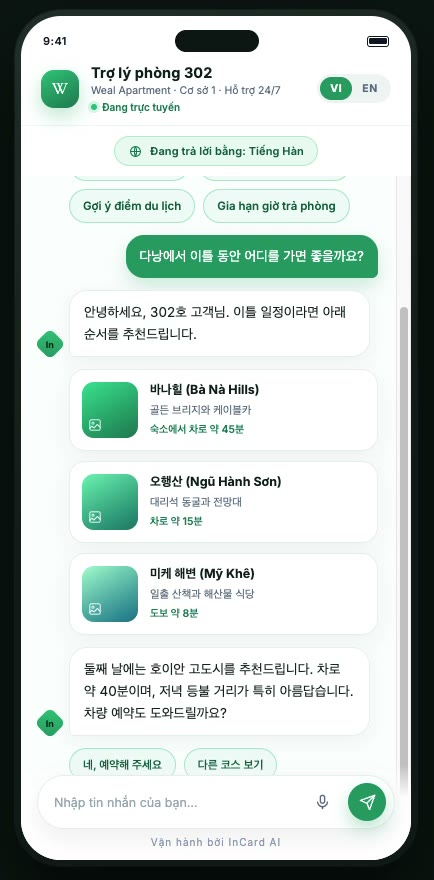
Technically this is a Custom AI Agent connected to the property’s operational data: the room list, the service price list, the late-checkout policy, the escalation contacts. It is not a generic chatbot.
Which properties should use this, and which should not?
Not every model benefits. Self check-in fits best with:
- Serviced apartments and multi-location homestays: staffing a desk in every building is not realistic, and guests arrive throughout the day.
- Small hotels under 40 rooms: busy enough that night duty is a burden, not busy enough to fund a dedicated night shift.
- Properties with many international guests: the translation and passport-reading parts save the most here.
Conversely, a 4–5 star hotel that sells the arrival experience itself, or a property where nearly all guests arrive during office hours, will see far less benefit than the deployment effort costs. In that case the part worth doing first is the post-arrival assistant, not the check-in flow.
What do you need in place to deploy it?
Four things, in order from mandatory to optional:
- A booking data source. A connection to the PMS or channel manager in use, so the flow can find the right reservation. Without one, you need at minimum a single consistent reservation table.
- A way to hand over the key. A mechanical code lockbox is the cheapest option and works immediately. Electronic locks allow a unique code per stay that expires on its own.
- Written policy. Deposit amount, refund conditions, check-in and checkout times, late fees — the AI applies exactly what has been written down, nothing more.
- An escalation owner. Someone always has to receive the cases the system hands out. That share is small, but it is never zero.
Real deployment time depends mostly on point 1 — a property with a PMS that exposes an API moves considerably faster than one running on spreadsheets.
Restaurants and small venues face the same out-of-hours problem with reservations and enquiries; AI agents for restaurants covers how agents handle it and where a person still needs to step in.
Where to start
If you run a hotel, serviced apartment or homestay and want to see this flow running on your own property’s data, InCard builds the demo around your actual model before any deployment discussion.
See the other problems we work on in hospitality & travel, or book a demo to talk it through.